
Eventleaf Guide
Jolly Technologies IncEvents
3.18.00 Reviews
- Version
- 5.0.3
- Installs
- 10.00K
- Age Rating
- Everyone
Screenshots
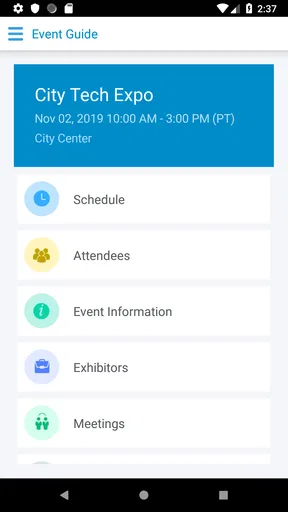
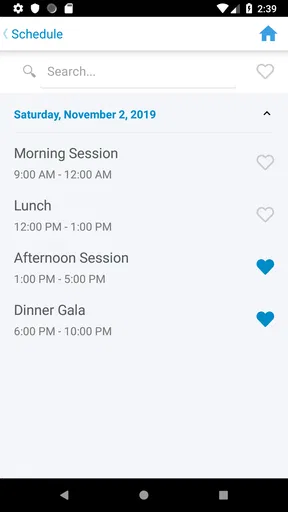
Our Review of Eventleaf Guide
 Analysis by Appyee
When I attend an event, I want the practical information to stay close at hand instead of being buried in a long email thread or printed across several pages. Eventleaf Guide is built for that narrow but useful purpose: it lets attendees view event information and documents on an Android phone or tablet. I found it most helpful when I treated it as a companion for an event rather than as a complete event-planning platform.
This is a free events app from Jolly Technologies Inc, with an Everyone content rating. It has passed the early stage of its life and remains available in version 4.10.4, while its Android requirement is version 8.0 or later. Its average rating is 3.1 from roughly two dozen ratings, and the app has more than ten thousand installs. Those figures suggest a small, specific audience rather than a huge consumer service, so my expectations were better when I judged it as a focused event guide.
How Eventleaf Guide works when you need information quickly
I focus here on the moment when event information needs to be found quickly, because that is where a dedicated guide can earn its place. I’d use the time before the event to work out which documents matter most, so a later lookup is about finding the right item rather than figuring out the app. That small bit of preparation can make a noticeable difference when a break is short or the venue is unfamiliar.
Readability and navigation during a busy event
The main strength of Eventleaf Guide is its straightforward purpose. An attendee opens the app to reach event material on a phone or tablet, not to manage a complicated personal productivity system. That focus can be valuable at a conference, meeting, training day, or other organized gathering where the host has prepared information and documents for participants.
I like this approach because an event guide has a different job from a calendar or a general notes app. A calendar may tell me that something is happening, but it does not necessarily put the event’s own documents in the same place. A notes app can store files, but I have to create the structure myself. Eventleaf Guide is intended to provide the event’s own information in an organized attendee-facing space.
The experience is easiest to understand when the organizer has prepared the material carefully. Clear document names and logical event information make a bigger difference here than decorative design. If I am standing in a crowded venue and checking my phone between sessions, I want to recognize the right item without reading a wall of text. The app’s usefulness therefore depends partly on how thoughtfully the event has been set up.
For readability, a phone is convenient but naturally limited by its smaller screen. A tablet is likely more comfortable for reviewing longer documents, schedules, or several pages of reference material. I would use a phone for a quick check and a tablet when I expected to read extensively. That distinction matters for people who find small text tiring or who need more room to scan a page.
One practical habit is to open the guide before arriving. I would check the event information while I still have time, identify the documents I am likely to need, and avoid making my first attempt while walking through an unfamiliar venue. This is not a flashy feature, but it is a useful workflow: preparation reduces the pressure placed on navigation when the event is already underway.
Motor and sensory considerations
Using a phone-based guide can be easier than handling a folder of loose papers, especially when I am carrying a bag, using public transport, or moving between rooms. The device keeps the material in one place and avoids the need to shuffle pages. For someone with limited hand strength or difficulty managing paper, that may be a meaningful everyday advantage.
At the same time, the app does not remove the ordinary challenges of mobile use. Tapping small controls, scrolling through long material, holding a device steady, and switching between documents can still be tiring. I would not assume that a digital guide automatically works for every motor ability. A tablet, a supported device setting, or assistance from a companion may make the experience more comfortable depending on the person.
Sensory conditions also change the experience. A bright conference hall, dim auditorium, outdoor venue, or noisy reception area can make phone reading harder. In those situations, I would use the guide before entering the room when possible, enlarge the device’s text if that helps, and avoid relying on a last-second lookup. The app gives access to event material, but the surrounding environment still determines how comfortably that material can be used.
There is a useful trade-off between digital convenience and visual fatigue. A printed document may be easier for someone who prefers paper or needs a particular physical layout, while the app is better for someone who wants to carry less and keep several event resources together. I would choose based on the person’s reading comfort, not on the assumption that digital is always more accessible.
Audio is another consideration. Eventleaf Guide is centered on viewing information and documents, so I would not choose it expecting a spoken guide or an audio-first experience. If a participant needs information delivered verbally, the event organizer or a human support channel may still be important. The app can complement that support, but it should not be treated as a replacement for every other format.
Situational access: where the app earns its place
A realistic example is a one-day professional event. I arrive at the venue, need to confirm where the next session is held, and want to consult a document without searching through messages. With Eventleaf Guide already prepared for that event, I have a dedicated place to look. That is more focused than opening an email inbox full of unrelated conversations, and it avoids carrying a printed pack that may become disorganized.
Another useful situation is attending an event with a tablet. The larger display can make longer documents less awkward to read, particularly when I need to compare sections or refer back to information while taking notes elsewhere. I would still keep the phone available for quick checks, but the tablet becomes the more comfortable reading surface.
The app may also suit attendees who prefer one event-specific destination rather than assembling information themselves. Someone who is not comfortable with file management may find it easier to open the guide supplied for the event than to download attachments, rename them, and place them into folders. That is a quiet benefit: less setup can mean fewer opportunities to lose the right document.
It is less convincing when the event is very informal or when all information already arrives in a simple, well-organized message. For a small gathering with one address and one start time, a calendar entry may be faster. Eventleaf Guide becomes more worthwhile as the quantity of event material grows, especially when attendees need to consult documents more than once.
Connection and device readiness are also part of situational access. I would not wait until the doorway to install the app, sign in if required by the event, or discover how the material is arranged. Checking everything in advance gives me a chance to identify a problem while I can still contact the organizer. This is particularly important for anyone who needs extra time, a larger screen, or help from another person.
What it does better than familiar alternatives
Compared with paper handouts, the app is easier to carry and less likely to become a stack of mixed pages. Compared with email, it offers a more event-focused destination instead of forcing me to search through messages and attachments. Compared with a general cloud-storage app, it is closer to the attendee’s point of view: I am looking for event material, not trying to administer a file system.
Those comparisons also show its limits. Paper can be more comfortable for some readers and does not depend on a battery. Email is already familiar to almost everyone and may be enough for a simple event. Cloud storage can be more flexible when I need to organize unrelated files or work with documents outside the event. Eventleaf Guide is strongest when the organizer has chosen it as the event’s information channel and the attendee wants a dedicated guide.
I would not install it as a general document reader. That would miss the point of the product. Its value comes from the connection between a particular event and the information made available for attendees. Without that context, a normal document app or the device’s existing tools may be more useful.
Remaining barriers and points of friction
The first barrier is dependence on event preparation. A well-designed guide can be convenient, but an unclear collection of documents will still feel unclear inside an app. If the host uses inconsistent titles, provides overly long files, or leaves important details scattered, the attendee may have difficulty regardless of the software.
The second barrier is that mobile reading is not equally comfortable for everyone. A person with low vision, attention-related challenges, hand tremors, or sensitivity to glare may need more than a basic phone interface. I would test the guide on the actual device before the event and decide whether the phone, a tablet, printed material, or assistance offers the best combination.
The third barrier is the pressure of the event itself. In a moving crowd, during a short break, or in a loud room, even a clear screen can be difficult to use. This is why I see advance checking as one of the most important practical tips. Find the key material early, note what you will need later, and avoid depending on a hurried search when the environment is demanding.
There is also a social consideration. Some attendees may not feel comfortable asking an organizer for help with a digital guide, while others may not have a suitable device available. An inclusive event should not assume that every participant has the same phone, reading preference, or confidence with apps. Eventleaf Guide can be part of a good access plan, but the organizer still needs to communicate clearly and offer reasonable alternatives where appropriate.
The rating of 3.1 indicates that the experience has not been universally smooth for the people who rated it. I would take that as a reason to test it before relying on it, not as an automatic rejection. Since the audience is relatively small, personal compatibility matters more than popularity. If the guide opens cleanly, presents the needed material clearly, and feels manageable on the chosen device, it may do its job well for that event.
Who should use it, and who should choose something else?
I would recommend Eventleaf Guide to attendees who regularly receive event documents and want them gathered in one event-specific place. It is also worth considering for people who prefer carrying a phone or tablet instead of a paper pack, and for anyone who finds email searches frustrating during a busy program.
I would be more cautious if I needed a broad accessibility toolkit, an audio-led experience, extensive personal organization, or a dependable substitute for printed material. In those cases, a general document solution, a calendar, email, paper copies, or direct organizer support may be a better fit. The right choice depends on whether the event guide’s focused role matches the attendee’s actual needs.
For families or groups sharing event information, I would also decide in advance who will hold the device and who needs to read the material. The app may simplify access to the documents, but it does not automatically solve shared-device logistics. A larger screen or a printed backup can be sensible when several people need to consult the same information.
My inclusive verdict
After looking at Eventleaf Guide as an attendee tool, I see a practical app with a deliberately limited scope. It is not trying to replace every event service or become a general-purpose organizer. Its best contribution is placing event information and documents in a dedicated mobile guide, which can reduce paper handling and make event material easier to revisit.
Its inclusive value depends on context. The app can help people who benefit from portable information, fewer loose pages, and a single event-focused destination. It is less suitable when reading on a small screen is difficult, when the venue is visually or acoustically challenging, or when someone needs audio, paper, or personal assistance. Those are not reasons to dismiss it; they are reasons to use it alongside other access options.
For me, the deciding question is simple: will this event actually use the guide well, and can I comfortably read it on my device? If the answer is yes, the free download is easy to justify for a document-heavy event. If the answer is no, a familiar alternative may create less friction. Eventleaf Guide works best when it supports a thoughtful event plan rather than being expected to solve accessibility by itself.
In short, I would keep it in mind for conferences, meetings, and organized gatherings where attendees need more than a single reminder but less than a full event-management system. The modest rating and focused audience suggest that it is not a universal must-have. Still, for the right event and the right reader, Eventleaf Guide can turn scattered event material into a more manageable reference point without asking attendees to carry another paper bundle.
Privacy and Permissions
See what permissions an app requests and how it handles your data.
- Photos/Media/Files
- read the contents of your USB storage, modify or delete the contents of your USB storage
- Storage
- read the contents of your USB storage, modify or delete the contents of your USB storage
- Camera
- take pictures and videos
- Other
- view network connections, full network access, prevent device from sleeping
Verdict
Strengths of Eventleaf Guide
- Clear event schedules make sessions easy to find.
- Useful maps help attendees navigate unfamiliar venues.
- Speaker and exhibitor details are available in one place.
- Push notifications can keep users updated during events.
- Event information remains accessible from a single mobile guide.
Limitations of Eventleaf Guide
- Features and content depend heavily on the event organizer.
- Some events may require registration before full access is available.
- Notifications can become excessive during busy multi-day events.
- Venue maps may be limited or outdated for certain locations.
- The app has little value when no supported event is currently active.
Similar Picks in This Category
View All
Easy Quran Mp3 Audio Offline
Muslim Worldapp4.7

Invitation Maker: Cards & RSVP
Greetings Island4.9

StubHub - Live Event Tickets
StubHub4.3

Fever: Events & Tickets
Fever Labs4.7

Epic Freebie Games Radar
Arioch Pds - Apps & Games4.4

Invitation card Maker, Design
Splendid App Maker4.9
Frequently Asked Questions
What is Eventleaf Guide used for?
Eventleaf Guide is a mobile companion for attendees at events organized through the Eventleaf platform. After signing in or entering the event information provided by the organizer, users can typically view schedules, session details, speaker information, venue locations, announcements, and other event resources. Its usefulness depends on how much content the organizer has published for that specific event.
Do I need an invitation or event code to use Eventleaf Guide?
In most cases, yes. Eventleaf Guide is designed around specific conferences, meetings, exhibitions, and other organized events, so access may require an invitation, registration email, ticket, QR code, or event-specific code. Some event information may be publicly visible, but private schedules, attendee features, and personalized content are generally available only after the organizer grants access.
Does Eventleaf Guide work without an internet connection?
Some event information may remain available after it has been loaded, but offline functionality can vary depending on the event setup and the app version. Features such as live announcements, updated schedules, maps, networking tools, registration changes, or synchronized attendee information may require an internet connection. It is best to open the event while online before arriving at the venue.
Can I use Eventleaf Guide to register for sessions or manage my event schedule?
Eventleaf Guide may provide agenda and schedule tools, including session descriptions, speaker details, locations, and sometimes options to bookmark or personalize activities. However, available controls depend on the organizer’s configuration. Certain sessions may require separate registration, have limited capacity, or use on-site check-in, so the app should be treated as a helpful event guide rather than a guarantee of admission.
Is Eventleaf Guide free, and what information does it require?
The app is generally intended for attendees and may be free to download, although access to particular events depends on the organizer’s registration rules. You may need to provide an email address, confirmation details, or an event code to sign in. If networking, notifications, location services, or QR-based check-in are enabled, the app may also request additional device permissions.
